
01
Graph-first AI agent builder
Build AI agents as workflow graphs — typed nodes, conditional edges, versioned drafts, one-click publish.
Build agents you can see. Design each AI agent as a workflow graph, connect tools, knowledge and memory, run multiple agents behind one app, and watch every run execute node by node with nothing hidden.
Scroll: the graph executes. This is the actual shape of an AgentRow run, the same graph you build in the editor, in the same order the runtime walks it.
A message arrives from chat, API, or an app event. Session, attachments, and app context enter the graph.
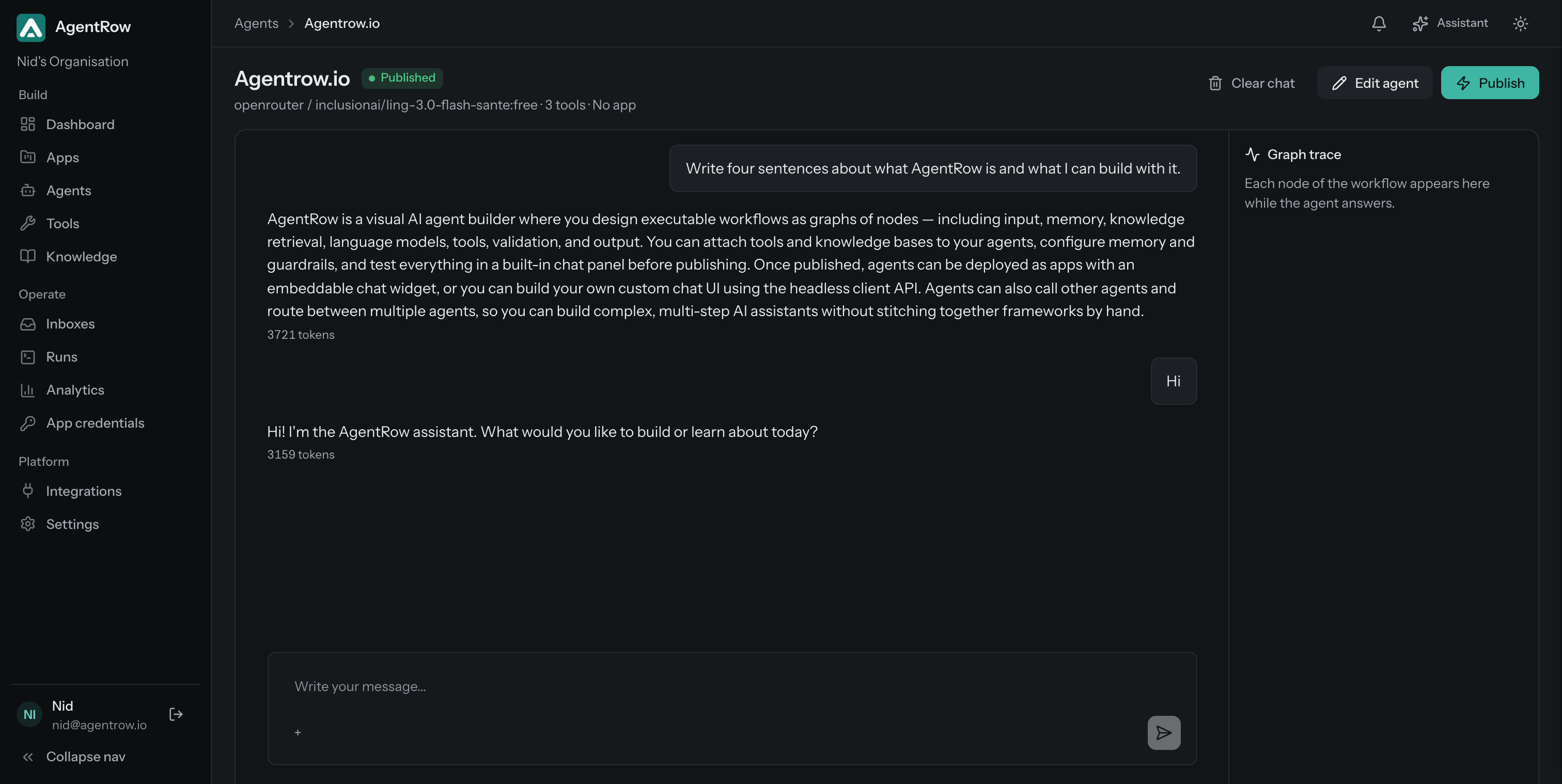
Chat with the agent while you edit it. The workflow, tools, knowledge, memory, and logs live beside the conversation.
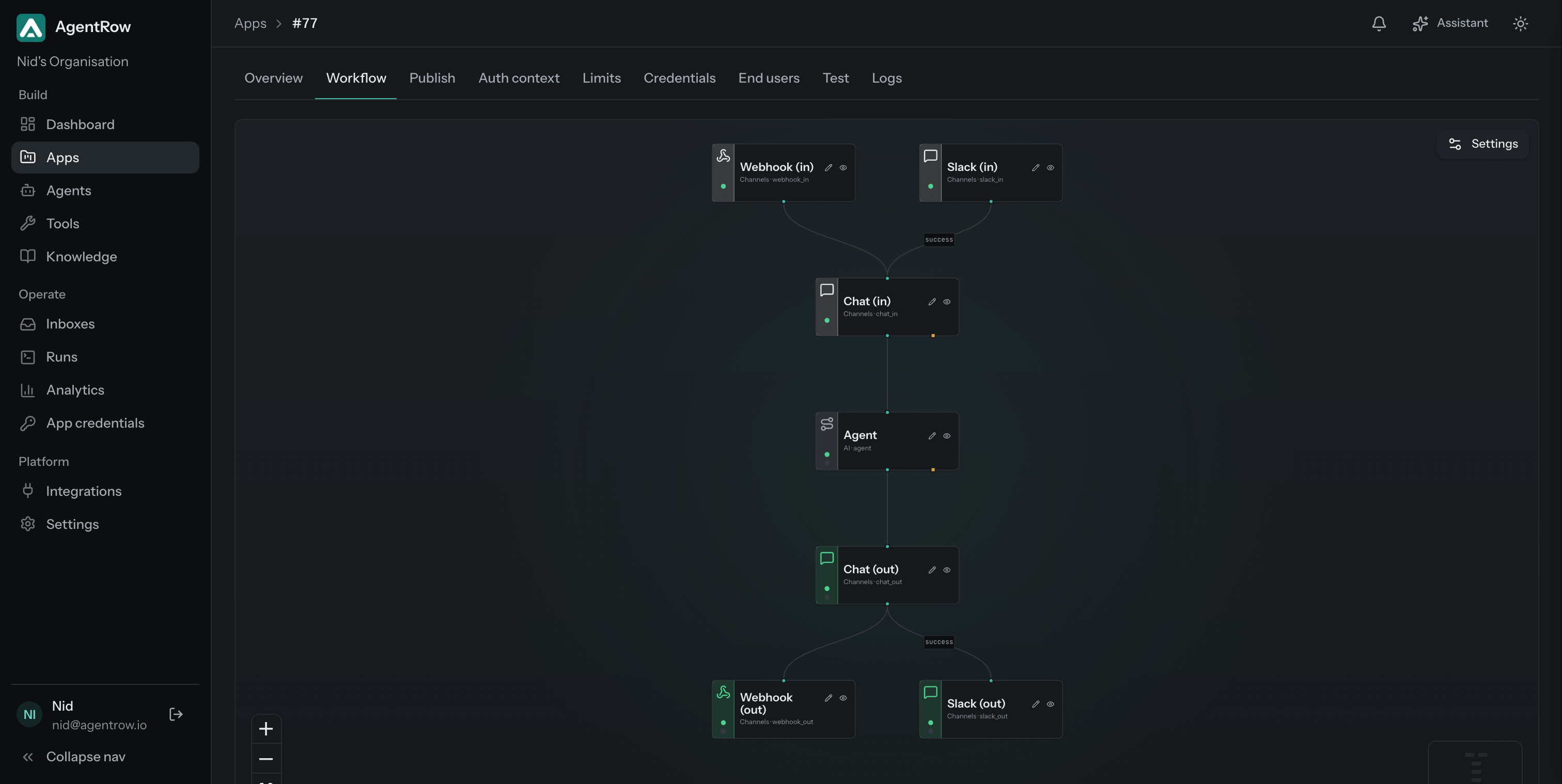
An app puts multiple agents behind a single surface. Its own graph routes each message to the right agent, runs it, screens the answer, and every nested run is traced like any other.
Selects the agent for each message from the attached agents' descriptions and roles.
Runs the selected agent's published workflow with the conversation and the user's context.
Screens the selected agent's answer with the app's own output rules and streams it to the chat surface.
Reaches users through the chat widget, the end-user API, a Slack bot or a signed webhook; a support app can hand the conversation to a person in the inbox.
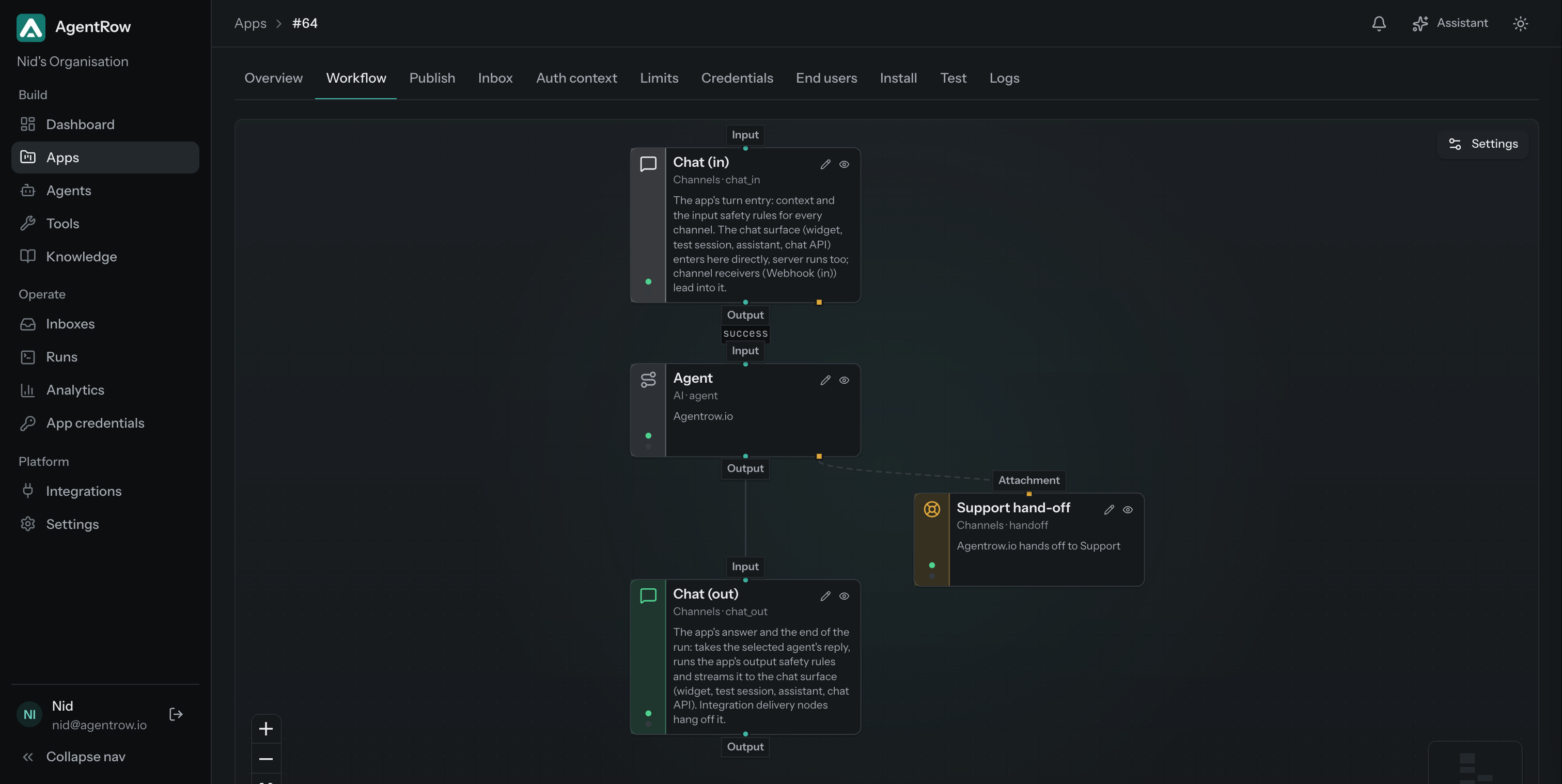
A support app gives its agent one more tool: hand this conversation to your team. The customer keeps the same chat, your team replies from the inbox, and the hand-off sits in the run trace like any other step.
Attach the Support hand-off node to an Agent node. You write when it should hand off and how it should reply, in plain language; the agent gets a built-in tool that does exactly that.
Open and Resolved tabs per app, the agent's reason and summary on every hand-off, and replies that reach the customer's chat under the team member's name.
The hand-off is a tool call in the run trace. A resolved conversation reopens when the customer writes again, and the AI stays out of the thread until then.
What you can use today, what is being built for the coming months, and what comes after. Dates move; the order does not.
Share a tool, an agent or a whole app with other organisations, free, and install what others shared as your own copy in one step. Selling comes later.
Share a tool, a toolbox, an agent or a whole app, free. A public listing installs as an editable copy, a private one as a sealed copy others can use but not open. Secrets never travel: the installer fills them in.
Every version is reviewed before it goes live. When you publish a new one, installers are told and update when they choose: their answers are kept, what they changed is theirs to keep or take, and a changed workflow arrives as a draft.
Planned: charge a subscription or a one-time price. Buyers install a sealed copy of the version you published, configure it and run it without ever seeing your workflow.
The same published graph answers on your website, in Slack, from a signed webhook or a server call, and can post every answer to your own endpoint. Channels are nodes on the canvas: where a turn came from and where the answer went are part of the run.
An embeddable chat widget with a JavaScript API (init, identify, open, events) and a headless client, or your own UI on the end-user API. Turns enter through Chat (in), the one place for context and input rules.
Your own Slack app, connected in a minute. Anyone in the workspace DMs or mentions it; answers land in the thread, and every thread is in the Inbox.
Other systems start runs by POSTing signed JSON. Signatures checked before parsing, duplicates recorded and never re-run, every event listed.
Your backend starts a run with the app secret: thread keys, sync or async with a callback, idempotency, optional identity.
Every finished answer posted to your endpoint as signed JSON. A delivery is a traced step; a failed one never fails the run.
Build AI agents as workflow graphs — typed nodes, conditional edges, versioned drafts, one-click publish.
The toolbox picks the right tools per message with vector search plus lexical reranking — no prompt stuffing.
Give agents access to APIs, databases, webhooks, internal services, and custom actions.
Ground responses with document knowledge bases, pgvector retrieval, and score-aware reranking.
Workspace, app, agent, and user memory scopes with explicit read and write nodes in the graph.
Inspect traces, tool calls, logs, tokens, latency, errors, and step-by-step execution.
The agent hands a conversation to a person; your team replies from the inbox and the customer sees it in the same chat.
Add approvals, guardrails, secrets, rate limits, and deployment-ready execution rules.
A clear execution timeline for every run: model calls, tool inputs and outputs, retrieval scores, trims, errors, latency, and token cost. No more guessing why an agent behaved a certain way.
Answer from your knowledge base, look up orders with tools, and hand the conversation to a person in the inbox when the agent should.
Wire internal APIs into the toolbox and let the agent handle lookups, updates, and reports, with an audit trail. Ask it in Slack.
Ground drafts in your catalog and past proposals, keep tone in instructions, and review every generation.
Search products semantically, check stock and orders through tools, and remember the shopper across sessions. The Shopify app puts the assistant in the storefront chat; its App Store listing is on the way.
Feed it logs and docs, give it read-only tools, and trace exactly which context produced each answer.
Start it from a signed webhook or a server call, chain tools with routes and approval gates, and post the result back to your system.
Bring your own model keys or point AgentRow at your own model server. One app answers on your site, in Slack and on a Shopify store, its tools reach your systems, and retrieval runs on Postgres with pgvector.
An AI agent, or intelligent agent in artificial intelligence, is software that takes an input, reasons with a language model, uses tools and memory, and acts to reach a goal, often over several steps. In AgentRow an agent is an executable workflow graph: input, memory, knowledge retrieval, the model, a toolbox loop and a final answer, with every step recorded.
Agentic AI describes systems where agents plan and act rather than answer a single prompt: they decide which tools to call, read the results, and continue until the task is done or a limit is reached. AgentRow runs that loop inside the graph, with a tool budget, approval gates for risky actions and a trace of every iteration.
Textbook types are reflex agents that react to rules, model-based agents that keep state, goal-based and utility-based agents that plan toward an outcome, and learning agents that improve from feedback. In products the common examples are customer support agents, e-commerce assistants, internal knowledge assistants, workflow automation agents and coordinator agents that delegate to specialists.
A multi-agent system is several agents working on one problem, usually with a router or coordinator that decides which agent handles a request and passes it the context. In AgentRow an app is that system: a router in front of multiple agents, one answer out, every nested run traced.
AI memory is what an agent keeps between conversations: facts and preferences about a user, an app or the agent itself. AgentRow stores memory as explicit items with a scope, reads them through a node in the graph, and asks for approval before anything is saved.
Yes. The embeddable chat widget is one script with a JavaScript API: init with your app id, identify to sign a user in with a token your backend issues, open, logout, and events for every message, tool call, hand-off and run. The same script exposes a headless client for a custom chat UI, and the end-user API serves your own frontend or backend directly.
Yes. The visual builder covers instructions, model, tools, knowledge bases and memory, and every new agent starts with a working workflow. Developers get the same graph with per-node settings, an end-user API, webhooks and server runs when they need them.
Start with a free workspace, wire your first graph, and scale when your agents do. Product teams and AI agencies building assistants for clients get the same platform, with a Scale plan for many stores. Sign up and the first month is free.